Written walkthrough · Owned-site example
A real page.
Three useful checks.
Here’s how I’d review my own website, so you can see the kind of feedback you’ll get.
This written example uses DougConnell.com. Your free audit is a personal five-minute video of your business, delivered within one business day.
This is a demonstration of my approach, not a client case study or a claim of improved results.
Explore the example01 / The promise
Make the next screen
feel like the right place.
If someone expects a free video audit, they should be able to find that offer without guessing where to go.
What I can see
The first phone screen names the free video audit and says it is a five-minute review delivered within one business day. The button leads to the request form.
The recommendation: keep the promise, page and button talking about the same thing.
Next: make contact easy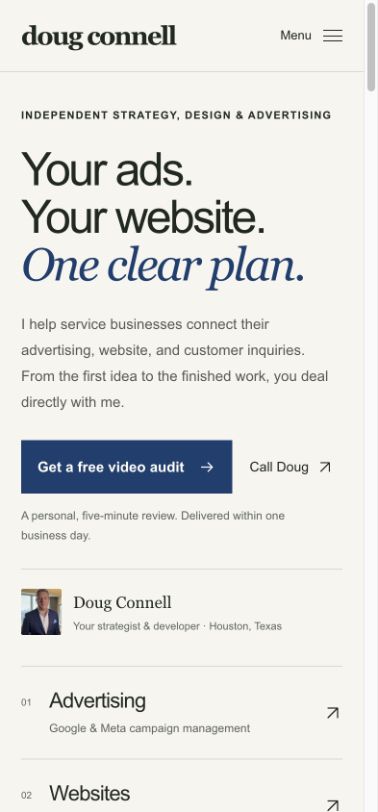
The screenshot could not load. The observation alongside it explains the check. Open the owned page.
02 / The next step
Give a busy visitor
a clear choice.
On a phone, the important action should be easy to find, read and tap. A request and a call are different choices.
What I can see
The audit request is the main button. “Call Doug” is available beside it for someone who prefers a conversation. Requesting an audit does not require a call.
The recommendation: make the preferred action prominent and keep other contact options understandable.
Next: the request and replyThe screenshot could not load. The page provides an audit-request button and a separate telephone link.
Two understandable choices.
Request the video, or choose to call.
03 / The request & reply
Ask for what you need.
Explain what comes next.
The form is part of the conversation. It should ask enough to prepare a useful reply without making someone complete a sales interview.
What I can see
This form asks for a website, Facebook page or business name, a name and an email address. A mobile number is optional. The reply notice explains how the details will be used, and the page explains the free review and delivery time.
The recommendation: keep the request focused, then give each genuine inquiry a clear owner and next action.
What this example does—and does not—prove
These are real pages from my own site. The form and owner-alert path have been checked using clearly marked test requests. That is a functional check, not evidence of customer demand, paid clients or a conversion-rate improvement.
A useful review also separates a button click, a saved request and a paying customer. Those are different outcomes.
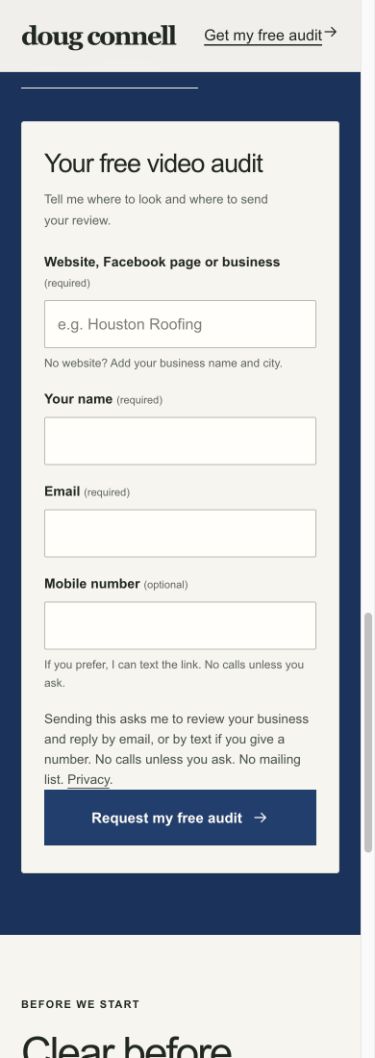
The form screenshot could not load. The required fields, optional mobile number and reply notice are described alongside it. View the request form.
Now, your business
The same care.
Your actual website.
Send your website, Facebook page or business name. I’ll record a free five-minute video showing what I’d check and what I’d fix first.
Within one business day. No call required.
If you want implementation afterward, we agree on the scope first. Ad management is $750/month for one selected Google or Meta channel, one offer and one inquiry path, plus separate ad spend. Website builds, filming and substantial setup or tracking repairs are quoted separately.